
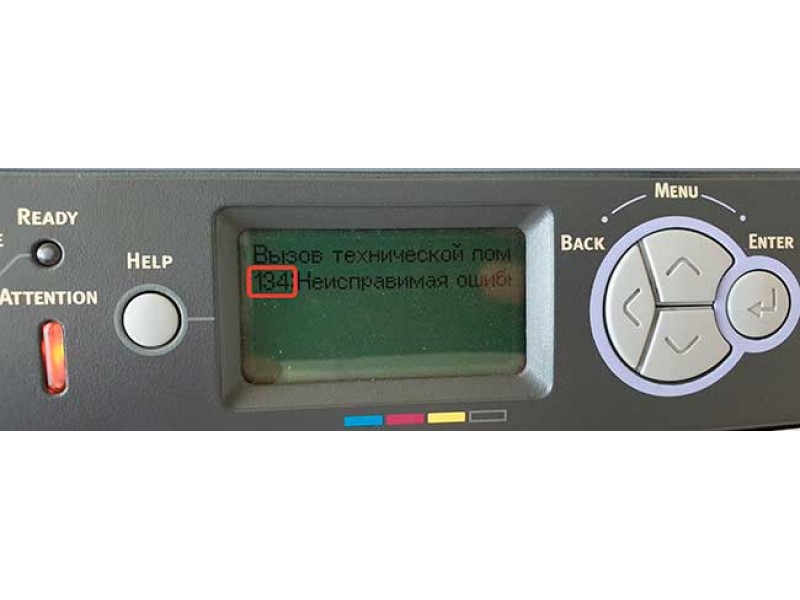
Коды ошибок для принтеров OKI в основном сходятся, но в современных аппаратах они значительно дополнены и детализированы. Например, при возникновении ошибки 231 (ошибка записи данных в чип) стал указываться подкод, указывающий на конкретный цвет картриджа или барабана.
| Panel display | Cause | Check details | Result | Solution |
| Inspection is required. | Machine Check Exception hardware fault detection (board failure or poor power sup- ply) | Does this error mes- sage reappear? | Yes | Cycle the power. |
| 001:Error | Replace the CU/PU board. | |||
| Recovered from an error. | Program detects the wrong pro- cess | Does this error mes- sage reappear? | Yes | Push the [OK] button and close the error screen, after a record with all numerical value displayed on LCD. Replace the CU/PU board. |
| 002:Er- | ||||
| ror xxxxxxxx xxxxxxxx xxxxxxx 003:Er- | ||||
| ror xxxxxxxx xxxxxxxx xxxxxxx 004:Er- | ||||
| ror xxxxxxxx xxxxxxxx xxxxxxx 005:Er- | ||||
| ror xxxxxxxx xxxxxxxx xxxxxxx 006:Er- | ||||
| ror xxxxxxxx xxxxxxxx xxxxxxx 007:Er- | ||||
| ror xxxxxxxx | ||||
| xxxxxxxx xxxxxxx | ||||
| Recovered from an error. | Program detects the wrong pro- cess | Push the [OK] button and close the error screen, after a record with all numerical value displayed on LCD. | ||
| 009:Error Recovered from an error. | ||||
| 010:Error Recovered from an error. | ||||
| 011:Error | ||||
| Power OFF/ON 024:Error | CU Program detects the error for hash on the DIMM slot | Does this error mes- sage reappear? | Yes | Cycle the power. |
| Replace the CU/ PU board. | ||||
| Inspection is required. | Detect the CU RAM Check er- ror | Does this error mes- sage reappear? | Yes | Re-implement the RAM DIMM and turn on the MFP. |
| 030:Error | Replace the CU/ PU board. | |||
| Panel display | Cause | Check details | Result | Solution |
| Inspection is required. | Detect the CU EEPROM error | Does this error mes- sage reappear? | Yes | Cycle the power. |
| 040:Error | Replace the CU/ PU board. | |||
| Inspection is required. | Failed to access to the Flash ROM that is directly mounted on the CU/PU board | Does this error mes- sage reappear? | Yes | Cycle the power and format the Flash memory. |
| 042:Error | Replace the CU/ PU board. | |||
| Inspection is required. | The format var- sion of the Flash differs from pro- gram supports | |||
| 043:Error | ||||
| Inspection is required. | Failed to fo- mat the Flash memory | |||
| 045:Error | ||||
| Inspection is | Incompatibility | Replace with a head of proper | ||
| required. | between the CU | resolution. | ||
| 049:Error | and the engine | |||
| head type (reso- | ||||
| lution) | ||||
| Power OFF/ON 052:Error | A DMA Abort er- ror was detected with the Image Processor. | Does this error mes- sage reappear? | Yes | Cycle the power. |
| Replace the CU/PU board. | ||||
| Recovered from | Detect the com- | Record the figures on the | ||
| an error. | munication error | LCD, and close the error | ||
| 054:Error xxx yyy | between the | display. | ||
| zzz | Controller unit | |||
| and scanner unit | ||||
| Recovered from an error. | Controller unit cannot detect the scanner unit | Does this error mes- sage reappear? | Yes | Push the [OK] button and close the error screen, after a record with all numerical value displayed on LCD. Check the connection be- |
| 055:Error | tween the scanner and printer. | |||
| Replace the CU/PU board. | ||||
| Does this error mes- | Yes | |||
| sage reappear? | ||||
| Inspection is required. | Controller unit cannot detect the hard disk | Power off the MFP and attach the hard disk and power on the MFP. | ||
| 056:Error | ||||
| Panel display | Cause | Check details | Result | Solution |
| Recovered from an error. | Detect the time out between the Controller unit and scanner unit 01 : No ACK for read beginning command | Push the [OK] button and close the error screen, after a record with all numerical value displayed on LCD. | ||
| 057:Error | 02 : No ACK | |||
| for read cancel command | ||||
| 03 : No ACK for SIP cancel com- | ||||
| mand | ||||
| Recovered from an error. | Detect the error at scanner con- trol section | Push the [OK] button and close the error screen, after a record with all numerical value displayed on LCD. | ||
| 058:Error | ||||
| 1. : SIP internal error | ||||
| 2. : Scan Model internal error | ||||
| 3. : SPB internal | ||||
| error | ||||
| Inspection is required. | Detect the com- munication error with the Sleep Mode interface supervisor pro- gram. | Does this error recur? | Yes | Cycle the power. |
| 067:Error | Replace the CU/PU board. | |||
| Inspection is required. | Malfunction of the NIC chip was detected. | Does this error recur? | Yes | Cycle the power. |
| 069:Error | Replace the CU/PU board. | |||
| Power OFF/ON 070:Error | A PSE firmware error was de- tected. | If display the address on the LCD, record the figures and close the error display and cycle the power. | ||
| Power OFF/ON 072:Error | I/F error between CU and PU | Record the figures on the lower right side of the LCD, and cycle the power. | ||
| Power OFF/ON 073:Error c/ xxxxxxxx | Detect the Video circuit over run. | Record the figures on the lower right side of the LCD, and cycle the power. | ||
| Power OFF/ON 075:Error c/ xxxxxxxx | Video error. An error was detected in | Does this error recur? | Yes | Cycle the power. |
| expanding image | Replace the CU/PU board. | |||
| data. | ||||
| Panel display | Cause | Check details | Result | Solution |
| Power OFF/ON 077:Error | VIC Illegal De- comp Error | Does this error recur? | Yes | Cycle the power. |
| Replace the CU/PU board. | ||||
| Recovered from an error. | Communication Error with Opera- tor Panel Unit | Does this error recur? | Yes | Push the [OK] button and close the error screen, after a record with all numerical value displayed on LCD. Replace the CU/PU board. |
| 078:Error | ||||
| Recovered from an error. | Failed to access to the parameter storage | Does this error recur? | Yes | Push the [OK] button and close the error screen, after a record with all numerical value displayed on LCD. Replace the CU/PU board. |
| 080:Error | ||||
| Inspection is required. | Parameter matching check error | Format the EEPROM , Flash and need the initialize. | ||
| 081:Error | ||||
| Inspection is required. | Detect the error at stapler unit. | Does this error recur? | Yes | Check the stapler unit and cable. |
| 090:Error | At first change the stapler unit, and if it becomes the er- ror again, change the cable. | |||
| Replace the CU/PU board. | ||||
| Inspection is required. | An engine EEPROM read/ write error was detected at power on | Does this error recur? | Yes | Cycle the power. |
| 104:Error | Replace the CU/PU board. | |||
| Inspection is required. | Not detect the EEPROM at | Does this error recur? | Yes | Cycle the power. |
| 105:Error | power on | Replace the CU/PU board. | ||
| Inspection is required. | Detect the error at engine control logic | Cycle the power. | ||
| 106:Error | ||||
| Inspection is required. | A duplex unit for another model was detected | Is a duplex unit provided for this model installed? | No | Install a correct duplex unit. |
| 111:Error | ||||
| Inspection is required. | A Tray2 for an- other model was detected. | Is a Tray2 provided for this model installed? | No | Install a correct Tray2. |
| 112:Error | ||||
| Inspection is required. | A Tray3 for an- other model was detected. | Is a Tray3 provided for this model installed? | No | Install a correct Tray3. |
| 113:Error | ||||
| Inspection is required. | A Tray4 for an- other model was detected. | Is a Tray4 provided for this model installed? | No | Install a correct Tray4. |
| 114:Error | ||||
| Panel display | Cause | Check details | Result | Solution |
| Inspection is required. | High voltage power supply interface error | Is the cable connect- ing the CU board to the high voltage power supply unit connected properly? | No Yes | Re-connect them properly. Check for defective contact points of the high voltage system. |
| 121:Error | Is there any defective | |||
| contact point? | Replace the high voltage power supply unit. | |||
| No | ||||
| Inspection is required. | Low voltage FAN error | Is the FAN of the low voltage power supply block working? | No | Check to make sure connec- tion of the FAN connector. |
| 122:Error | Replace the low voltage power supply unit. | |||
| Replace the FAN motor. Replace the low voltage | ||||
| Is the FAN connector connected correctly? | Yes | power supply unit. | ||
| No Yes | ||||
| Inspection is required. | Abnormal envi- ronment humid- ity or uncon- nected humidity sensor | Does this error recur? | Yes | Cycle the power. Replace the Environment sensor board. |
| 123:Error | ||||
| Inspection is required. | Abnormal envi- ronment humid- ity | Does this error recur? | Yes | Cycle the power. Replace the Environment sensor board. |
| 124:Error | ||||
| Power OFF and Wait for a while. 126:Condensing Error | Dew condensa- tion in the printer was detected. | This error tends to occur after a printer is carried in from the outsides. | Yes | After leaving the printer at room temperature, turn on the power again. |
| -------- | Leave the printer for 2 hours to half a day at room temperature, and turn on the power. Does this error recur? | |||
| (With the early firmware version, displaying as fol- low) | Replace the Environment sensor board. | |||
| Inspection is required. | ||||
| 126:Error | ||||
| Inspection is required. | Fuser FAN error | Is the FAN connector connected properly? Does this error recur? | No Yes Yes | Re-connect it properly. Replace the FAN motor. Replace the CU/PU board. |
| 127:Error | ||||
| Panel display | Cause | Check details | Result | Solution |
| Inspection is required. | PU FAN error 04 : Belt Cooling Fan Error | Is the FAN connector connected correctly? | No | Check to make sure connec- tion of the FAN connector. |
| 128:Error xx | 05 : Fuser Side Fan Error | Replace the FAN motor. | ||
| 08 : Image Drum Motor Fan Error 0A : Fuser Intake Fan Error | ||||
| 0C : Duplex Fan Error | Yes | |||
| 0D : Fuser Ex- | ||||
| haust Fan2 Error | ||||
| Inspection is required. | LED head detec- tion error (131=Y, 132=M, 133=C, 134=K) | Is the cable normally? | Yes | Check the LED head, the cable of CU/PU board and connector. |
| 131:Error | Because the protection fuse on the CU/PU board may perform blowout, replace the CU/PU board. | |||
| Inspection is required. | ||||
| 132:Error | ||||
| Inspection is required. | ||||
| 133:Error | ||||
| Inspection is required. | ||||
| 134:Error | ||||
| Inspection is required. | Detected a malfunction of the ID Up/Down mechanism. | Connected properly? | Yes | Check the connection of ID Up/Down motor and sensor. Replace the CU/PU board. |
| 142:Error | ||||
| Inspection is required. | The belt unit fuse blown out. | |||
| 154:Error | ||||
| Inspection is required. | The fuser unit fuse blown out. | |||
| 155:Error | ||||
| Inspection is required. | Toner sensor detection error (160=Y, 161=M, 162=C, 163=K) | Because it is an error not to be occur in the in front of the user, change the CU/PU board when it is displayed in front of the user. | ||
| 160:Error | This error does not occur with the factory de- fault settings. | |||
| Inspection is required. | ||||
| 161:Error | ||||
| Inspection is required. | Is the toner cartridge installed? | No No | Install the toner cartridge. | |
| 162:Error | Is the lock lever of the toner set? | Yes | ||
| Inspection is required. | Does this error recur? | Move the lock lever of toner cartridge to the lock position. Replace the toner sensor as- sembly. | ||
| 163:Error | ||||
| Panel display | Cause | Check details | Result | Solution |
| Inspection is required. | An abnormality was detected with the power supply tempera- ture thermistor. 01 : The power supply thermis- tor is detected as shorted. | 01, 02: | Cycle the power. Replace the high voltage power supply unit. | |
| 166:Error xx | Does this error recur? Does this error recur? Does this error recur? 03: | Yes | Replace the CU/PU board. Replace the cable between the high voltage power supply unit and the CU/PU board. | |
| 2. : The power supply thermis- tor is detected as open. | ||||
| 3. : The power supply thermis- tor indicates high temperature error. | Yes Yes | Remove anything obstructing the ventilation slots if any and restore the power. | ||
| 4. : The power supply thermis- tor indicates low temperature error. | Does this error recur? | Replace the high voltage power supply unit. | ||
| Replace the CU/PU board. Replace the cable between the high voltage power supply unit and the CU/PU board. | ||||
| Does this error recur? Does this error recur? | ||||
| Raise the room temperature and restore the power. | ||||
| Replace the high voltage power supply unit. | ||||
| Replace the CU/PU board. Replace the cable between the high voltage power supply | ||||
| 4:00 | Yes | unit and the CU/PU board. | ||
| Does this error recur? | Yes Yes | |||
| Does this error recur? Does this error recur? | ||||
| Yes | ||||
| Yes Yes | ||||
| Inspection is required. | An abnormality was detected with the thermis- tor. | Is the error message displayed? | Yes | Cycle the power. |
| 167:Error | Does this error recur? | |||
| Yes | Replace the fuser unit. | |||
| Panel display | Cause | Check details | Result | Solution |
| Inspection is required. | An abnormal- ity was de- tected with the Compensation Thermistor | Is the error message displayed? | Yes Yes | Cycle the power. Replace the fuser unit. |
| 168:Error xx | Does this error recur? | |||
| 1. : The com- pensation therm- istor is detected as shorted. | ||||
| 2. : The com- pensation therm- istor is detected as open. | ||||
| 3. : The com- pensation therm- istor indicates high temperature error. | ||||
| 4. : The com- pensation therm- istor indicates low temperature | ||||
| error. | ||||
| Inspection is required. | An abnormality was detected with the Upper side Thermistor 01 : The upper side thermistor is detected as shorted. | Is the error message displayed? | Yes Yes | Cycle the power. Replace the fuser unit. |
| 169:Error xx | Does this error recur? | |||
| 2. : The upper side thermistor is detected as open. | ||||
| 3. : The upper side thermistor indicates high temperature er- ror. | ||||
| 4. : The upper side thermistor indicates low temperature er- | ||||
| ror. | ||||
| Panel display | Cause | Check details | Result | Solution |
| Inspection is required. | Short circuit of the heat roller Thermistor was detected. | Does this error recur? | Yes | Cycle the power. Replace the fuser unit. |
| 170:Error | ||||
| Inspection is required. | Open circuit of the heat roller Thermistor was detected. | |||
| 171:Error | ||||
| Inspection is required. | Heat roller thermistor de- tected the high- temperature. | Does this error recur? | Yes | After leaving the printer, turn on the power again. |
| 172:Error | Replace the fuser unit. | |||
| Inspection is required. | Heat roller thermistor de- tected the low- temperature. | Does this error recur? | Yes | Cycle the power. Replace the fuser unit. |
| 173:Error | ||||
| Inspection is required. | Short circuit of the backup roller Thermistor was detected. | Does this error recur? | Yes | Cycle the power. Replace the fuser unit. |
| 174:Error | ||||
| Inspection is required. | Open circuit of the backup roller Thermistor was detected. | Does this error recur? | Yes | Cycle the power. Replace the fuser unit. |
| 175:Error | ||||
| Inspection is required. | Backup roller thermistor de- tected the high- temperature. | Does this error recur? | Yes | Cycle the power. Replace the fuser unit. |
| 176:Error | ||||
| Inspection is required. | Backup roller thermistor de- tected the low- temperature. | Does this error recur? | Yes | Cycle the power. Replace the fuser unit. |
| 177:Error | ||||
| Inspection is required. | Duplex unit I/F error | Does this error recur? | Yes | Cycle the power. |
| 181:Error | Check to make sure the con- tact points of the connector and replace the Duplex unit. | |||
| Inspection is required. | Tray2 I/F error | Does this error recur? | Yes | Cycle the power. |
| 182:Error | Check to make sure the con- tact points of the connector and replace the Tray unit. | |||
| Inspection is required. | Tray3 I/F error | |||
| 183:Error | ||||
| Inspection is required. | Tray4 I/F error | |||
| 184:Error | ||||
| Panel display | Cause | Check details | Result | Solution |
| Recovered from an error. | System memory overflow | Push the [OK] button and close the error screen, after a record with all numerical value displayed on LCD. | ||
| 190:Error | ||||
| Power OFF/ON 203:Error ssssssssssssssss | CU program er- ror | Record the figures on the lower side of the LCD, and cycle the power. | ||
| Power OFF/ON 204:Error | Cycle the power | |||
| Power OFF/ON 207:Error | CU program er- ror | Cycle the power | ||
| Power OFF/ON 208:Error | ||||
| Power OFF/ON 209:Error | Custom Media Type table down- loading failed. | Cycle the power | ||
| Power OFF/ON 213:Error | CU program er- ror | Cycle the power | ||
| Power OFF/ON 214:Error | CU detected PU program error | Cycle the power | ||
| Inspection is required. | Not detect RFID Reader | RFID read device error Does this error recur? | Yes | Check the FFC connecting the RFID R/W board and the CU/PU board. |
| 230:Error | Replace the CU/PU board | |||
| and the RFID R/W unit | ||||
| Yes | ||||
| Panel display | Cause | Check details | Result | Solution |
| Inspection is required. | 01: RFID Reader I/F Error | 1:00 | Check the FFC connecting the RFID R/W board and the CU/PU board. | |
| 231:Error xx | 05: K Reader | Connect the FFC properly. | ||
| (TC/ID) - | ||||
| Tag interface connection error | Is the FFC connected properly? | Yes | Replace the CU/PU board. Replace the RFID R/W unit (Top cover). | |
| 06: Y Reader | Does this error recur? Dose this error recur? | |||
| (TC/ID) - | Yes Yes | |||
| Tag interface connection error | Move electronic equipment away from the printer is any on the printer, and restore the power. | |||
| 07: M Reader (TC/ID) - | Replace the toner cartridge or ID of the indicated color. | |||
| Tag interface connection error | 05 to 08, 11 to 14: | |||
| 08: C Reader | Check the antenna cable of the indicated color. | |||
| (TC/ID) - | ||||
| Tag interface connection error | Connect the cable properly. | |||
| 11: K Reader | Does this error recur after the power restora- tion? | Yes | ||
| (TC/ID) - | Does this error recur after the power restora- tion? | Adjust the antenna to the cor- rect position. | ||
| Tag interface connection error | Is the antenna cable connected properly? | Replace the RFID R/W unit (Top cover). | ||
| 12: Y Reader | Is the antenna set in the holder correctly? | Yes | ||
| (TC/ID) - | Does this error recur after the power restora- tion? | |||
| Tag interface connection error | ||||
| 13: M Reader (TC/ID) - | No No Yes | |||
| Tag interface connection error | ||||
| 14: Reader (TC/ ID) - Tag | ||||
| interface connection | ||||
| error | ||||
| Panel display | Cause | Check details | Result | Solution |
| Inspection is required. | More than one image drum tag of the same color was detected. | Is more than one image drum of the same color installed? | Yes | Cycle the power. Replace the image drum. |
| 232:Error | ||||
| Inspection is required. | Secure File Eras- ing Error | |||
| 250:Error | ||||
| Inspection is required. | Secure disk Eras- ing Error | |||
| 251:Error | ||||
| Inspection is required. | An unexpected error occurred during initializa- tion in the Secu- rity mode. | |||
| 254:Error | ||||
| Inspection is required. | An unexpected error occurred during initializa- tion of the HDD. | |||
| 257:Error | ||||
| Power OFF/ON 901:Error | Short circuit with the belt thermis- tor was detected. | Is the belt thermistor ca- ble connected properly? Does this error recur after power restoration? | No | Re-connect the cable prop- erly. |
| Replace the belt thermistor. | ||||
| Power OFF/ON 902:Error | Open circuit with the belt thermis- tor was detected. | Yes | ||
| Power OFF/ON 903:Error | Belt thermistor detected the high- temperature. | Is the belt thermistor ca- ble connected properly? Does this error recur? | No | Re-connect the cable properly and restore the power. |
| Replace the belt thermistor, after a lapse of 30 minutes, turn on the power. | ||||
| Power OFF/ON 904:Error | Belt thermistor detected the low- temperature. | Yes | ||
| Power OFF/ON 915:Error | Short circuit with the Duplex unit thermistor was detected. | Cycle the power. | ||
| Power OFF/ON 916:Error | Open circuit with the Duplex unit thermistor was detected. | |||
| Power OFF/ON 918:Error | Detect the Duplex Unit Fan-0 | |||
| Power OFF/ON 923:Error | The ID motor is not running nor- mally. | |||
| Power OFF/ON 928:Error | The fuser motor is not running normally. | |||
| Panel display | Cause | Check details | Result | Solution |
| Power OFF/ON 931:Error | Duplex unit CPU clock frequency error | |||
| Power OFF/ON 933:Error | Tray 2 CPU clock frequency error | |||
| Power OFF/ON 934:Error | Tray 3 CPU clock frequency error | |||
| Power OFF/ON 935:Error | Tray 4 CPU clock frequency error | |||
| Power OFF/ON 941:Error | A watch dog timer error was detected. | 941:Error | ||
| Turn off and on the MFP. When this error occurs again, replace the CU/ PU board. | ||||
| Power OFF/ON 942:Error | An undefined interruption was detected. | 942:Error | ||
| Turn off and on the | ||||
12.01.2025 07:12
1369